
Khajane 2: Karnataka’s Integrated Financial Management System
Khajane 2 (K2) is a major digital project launched by the Government of Karnataka. It works as an Integrated Financial Management System (IFMS) that manages the state’s financial activities on a single online platform. The system handles the complete financial process, starting from budget approval to the final submission of accounts to the Accountant General.
By moving financial operations to a digital system, Khajane 2 helps improve transparency, increases accountability among departments, and provides a secure platform for both government-to-government (G2G) and government-to-citizen (G2C) transactions. The main goal of K2 is to make financial management faster, more accurate, and more efficient across all government departments Bhoomi RTC.
What is Khajane 2 (K2)?
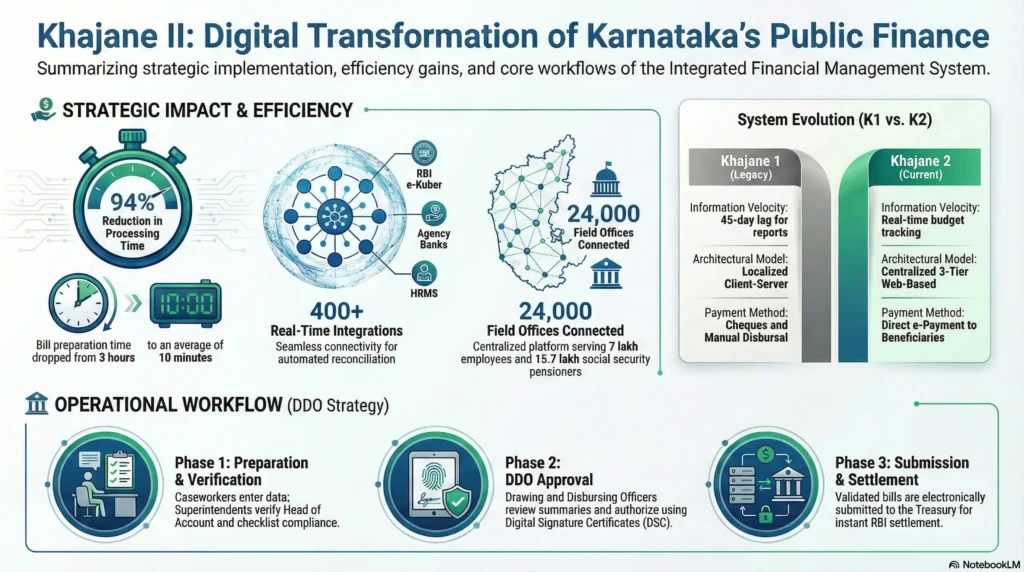
Khajane 2 is an integrated online platform created to manage government receipts and payments in real time. It replaced the older Khajane 1 (K1) system, which was mainly used to computerize treasury operations when it was introduced in 2001.
While Khajane 1 focused on basic treasury automation, the State Government decided in 2009 to upgrade to Khajane 2. The new system uses web-based technology and offers better integration with external organizations such as the Reserve Bank of India (RBI) and various commercial banks, making financial management more efficient and connected.
Evolution from Khajane 1 to K2
The move to K2 marks a major shift from basic computerisation to a true “digital-first” approach. Unlike K1, which had a 45-day delay in generating consolidated reports, K2 enables real-time budget monitoring and expenditure tracking. K2 also includes more than 400 real-time integrations with systems such as the RBI, HRMS, and agency banks, while K1 had very limited external connectivity.
User Access: Khajane 2 Login and Registration
Accessing the portal is the first step for both citizens and government officials to carry out financial tasks or make tax payments online. It allows users to manage payments, view records, and complete official financial services in one place.
How to Register as a New User
To use services such as challan payment, users need to register on the official portal first.
- Open the official website:
https://khajane2.karnataka.gov.in. - Click the “New User Registration”.
- Add your information including full name, mobile number, email ID, and your 12-digit Aadhaar number.
- Verify the OTP code send to registered mobile.
- Add unique username and password for future Khajane 2 login.
Khajane 2 DDO Login for Government Officers
The Khajane 2 DDO login is a special portal made for Drawing and Disbursing Officers (DDOs). DDOs play an important role in the system because they handle financial work for their departments. Using this portal, they can prepare and submit bills, manage employee salaries, allowances, and keep track of departmental expenses.
Biometric and DSC Enrollment
Security for DDOs is very strict and follows a structured workflow that includes three roles: Maker (who creates the bill), Checker (who verifies the details), and Approver (who gives final approval). All users must complete biometric registration, where Treasury Officers collect fingerprints and link them with the employee’s KGID number. In addition, obtaining a Digital Signature Certificate (DSC) is compulsory to perform transactions and official activities on the Khajane 2 (K2) system.
Services: Challan and Payments
Challan generation is the most commonly used service for people who need to pay license fees, property taxes, or other government charges.
Step-by-Step Khajane 2 Challan Generation
- Login
Go to your dashboard on the K2 portal. - Generate Challan:
Click on “Generate Challan” option. - Remitter Details:
Write your name, address and mobile number. - Selection of Purpose:
Select the correct government department, treasury code, and “Head of Account” (HoA). - Submit: Verify all details and click on “Submit”.
Payment Modes and Authorized Banks
You can use different methods to pay challan:
- e-Payment: Immediate online transfer via Net Banking, Credit/Debit cards, or UPI.
- Bank Counter: Generate a physical challan to be paid offline at designated bank branches.
Integrating Karnataka Bank for SNA Accounts
Karnataka Bank has connected its internet banking system with the K2 platform to support the Single Nodal Agency (SNA) account system used for Centrally Sponsored Schemes. This integration helps make sure that government development funds are transferred safely, transparently, and directly to the intended beneficiaries.
Tracking Your Transactions
The K2 portal lets users check their payment status and download official receipts for their records.
How to Khajane 2 Challan Search?
If your money has already been deducted but the status still shows “Make Payment,” you should do a K2 challan search to check the payment status.
- Open the portal and choose “Challan Search”.
- Add the Reference Number, Date of Payment, or Department Code.
- Click Search to check transaction status.
Receipt Generation and Download
After completing the payment successfully, the portal creates a digital receipt as proof of the transaction. You can download this receipt by entering your challan reference number in the “Receipt Download” section.
Technical Requirements and Troubleshooting
To make sure the portal works properly, users need to follow certain desktop configuration requirements.
System Configuration for Optimal Performance
The portal is configured to work best with certain older system components to maintain stable performance.
- Browsers: Google Chrome versions 40–44 or Internet Explorer 11 are recommended for the best performance.
- Drivers: Authentication requires Cogent 3M biometric drivers, while DSC functionality requires Moser Baer or Aladdin e-Token drivers.