
Bhoomi RTC Online
Looking for the Karnataka Bhoomi Online RTC portal at landrecords.karnataka.gov.in and complete information about land records? You’re in the right place. This guide covers everything you need, including direct access to the official Bhoomi RTC portal and step-by-step details on how to check RTC (Pahani), Mutation Extract, Khata Extract, revenue maps, and other important land record services in Karnataka.
Whether you are a property owner, a potential buyer, or someone searching for land details in Karnataka, this guide will help you every step of the way. We provide simple and clear instructions to help you use the Bhoomi RTC portal smoothly and access important land record services without any difficulty.
Bhoomi RTC Services
Bhoomi Portal
Access complete land record details
Mutation Extract
Download mutation record document
View RTC Pahani
View official land RTC details
Mutation Status Check
Check mutation request progress
Khata Extract
Download property ownership extract
Revenue Maps
View official land survey maps
| Portal Name | Bhoomi RTC |
|---|---|
| Launched By | Government of Karnataka |
| Under | Monitoring Cell (BMC) Revenue Department |
| Services Offered | View Bhoomi RTC and MR, Mutation services, Revenue maps, Khata Extract, i-RTC (digital RTC) |
| Primary Goal | To digitize and make land records accessible |
| Beneficiary | All Karnataka Citizens |
| Benefits | Easy access to land records, transparency, reduced land disputes, online applications for services |
| Official Website | Visit |
Bhoomi Online RTC Provided Karnataka Land Record Services
1. RTC Services
- Access RTC and MR View
- Get Khatha Extract
- View RTC Records nformation
- i-RTC Detailed Information
- i-RTC wallet management
2. Report Services
- Dispute case tracking
- Village-specific pending cases
- Bhoomi Online dashboard insights
- Historical Bhoomi RTC mutation records
- Bhoomi District dashboard analysis
- Reports on Bagair Hukum
- Aadhaar seeding status reports
- Land Activity Monitoring Reports
- Full Overview of applications submitted under Form 57
- Disposed Conversion Cases
3. Land Conversion Services
- Download Online application for land conversion
- View Status of Land Conversion
- Quickly Download final conversion orders
4. Survey [SSLR] Services
- Access survey documentation
- Request survey documents
- View revenue maps
5. Additional Services
- Conversion of binary files from ISFOC to UNICODE
- Citizen registration services
- RTC XML verification
- Ownership Mutation services
- Ease of Doing Business (EODB) services
- Crop loan waiver information
- Mojini services
- Parihara assistance
- Name matching algorithm
- Dishaank services
- Quiklcy Access to online Pahani and i-RTC
- Citizen portal functionalities
Purpose of Bhoomi RTC Online Portal
Bhoomi RTC Online Portal – Karnataka Land Records
The Bhoomi Online Portal was launched by the Government of Karnataka in 2000 to simplify access to land records and improve transparency in land management. Earlier, land records were maintained manually on paper, which often led to errors, delays, and lack of transparency. People, especially those living in rural areas, had to travel long distances to government offices to obtain important land information. With the introduction of the Bhoomi portal, citizens can now easily view and download land records online, making the process faster, more accurate, and convenient for everyone.
Why Bhoomi Matters
Bhoomi transformed the land record system by digitizing more than 20 million land records and making them easily available to citizens as well as government authorities. This digital shift enhanced accessibility, reduced manual errors, and brought greater transparency and reliability to the land administration process.
Key Features of the Bhoomi RTC Portal
RTC (Record of Rights, Tenancy, and Crops) – Also Known as Pahani
One of the key documents provided through the portal is the RTC (Record of Rights, Tenancy, and Crops), which contains the following details:
- Owner’s name
- Survey number
- Type and usage of land
- Details of tenancy
- Crop information
- This document plays an important role in legal and financial activities such as property ownership verification, loan approvals, and resolving land disputes. Users can conveniently access and download the RTC online without the need to visit government offices.
Mutation Services
The mutation process helps update land ownership records after a property is sold, gifted, or transferred through inheritance. Through the Bhoomi portal, users can easily track the mutation status online, which saves time, reduces paperwork, and makes the entire process more transparent and efficient.
Other Services Provided
- View RTC/Pahani documents
- Access Khata extracts
- Track mutation status
- View revenue maps
- Request survey documents
- Access survey documentation
These services provide citizens with a complete platform for managing land-related tasks through a simple and easy-to-use interface, making it accessible even for users with basic digital knowledge.
Impact and Reach
The Bhoomi portal has significantly improved Karnataka’s land record management system by making services faster, more transparent, and easier to access. It helps minimize corruption, strengthens administrative efficiency, and allows citizens to check property ownership records on their own, which increases transparency and helps prevent land-related disputes.
Today, almost every Indian state operates its own digital land record portal, such as Patta Chitta in Tamil Nadu and Meebhoomi in Andhra Pradesh. However, Bhoomi was one of the pioneering platforms that introduced digital land record management in India, inspiring many other states to adopt similar online systems.
| Feature | Description |
|---|---|
| Launch Year | 2000 |
| Portal Name | Bhoomi Online RTC Karnataka |
| State | Karnataka |
| Category | Land |
| Managed By | Revenue Department of Karnataka |
| Launched by | Karnataka State Government |
| Official Website | https://landrecords.karnataka.gov.in/ |
| Main Purpose | Providing easy and transparent access to land records in digital format |
| Records Available | Over 20 million land records, including RTC (Record of Rights, Tenancy, and Crops), mutation reports, and more |
| Key Document – RTC (Pahani) | Includes ownership details, land type, crop information, and tenancy details. Essential for legal matters like loan applications and dispute resolution. |
| Mutation Services | Allows users to check mutation status when land is sold or transferred. |
| Other Services | – View RTC/Pahani – Access Khata extracts – Track mutation status – View revenue maps – Request survey documents – Access survey documentation |
| Impact | Bhoomi improves transparency, reduces corruption, and enhances governance, enabling citizens to verify ownership independently. |
| State Examples | Bhoomi is among the first to digitize land records in India, with other states like Patta Chitta (Tamil Nadu) and Meebhoomi (Andhra Pradesh) following suit. |
Bhoomi RTC Online Login Process
- Visit to official Bhoomi online RTC website https://landrecords.karnataka.gov.in/
- Click on Login button in homepage. Add login Credentials.
- User ID: Enter the unique user ID that you have been assigned.
- Password: Enter the password associated with your account.
- Verify Captcha code.
- After verifying, click on Login button. You can access your Bhoomi Online portal.
Creating a New Account (If not exist)
If you do not already have an account on the Bhoomi Online portal, you can quickly register by following the simple steps below:
- Click on Register Button.
- Click on “Register” or “Create Account” for next process.
- Fill the Required Details.
- Mobile Number: Enter your valid mobile number.
- District: Choose the district where your land is located.
- Taluk: Select your taluk (sub-district).
- Village: Enter the name of the village.
- Survey Number: Provide the survey number of your land (this is a unique identifier for your property).
- Password: Choose a strong password for your account.
- Click on Submit button to create your account.
- Once your account is successfully created, you can receive a confirmation message.
How to Check or View Bhoomi RTC (Pahani) Online
- Visit the Bhoomi Karnataka Portal:
Visit to official Bhoomi Online Karnataka website. - Login:
If you already have an account on Bhoomi portal, login with User ID and Password. If you have not account create a new account.
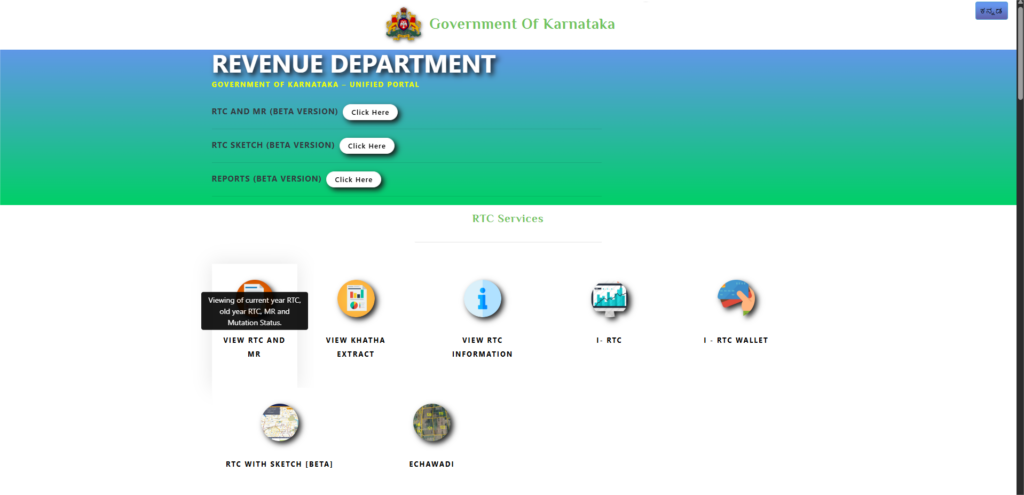
- Select ‘View RTC and MR’:
Click on “View RTC and MR” (Mutation Register). You can access the RTC and mutation details for your land.
- Fill Required Details:
After selecting the “View RTC and MR” option, a new page will open where you need to enter the required details to access the land records.- District: Select the district where the land is located.
- Taluk: Choose the taluk (sub-district).
- Hobli: Enter the Hobli (a smaller administrative division within the taluk).
- Village: Select the name of the village.
- Survey Number: Provide the specific survey number for the land.
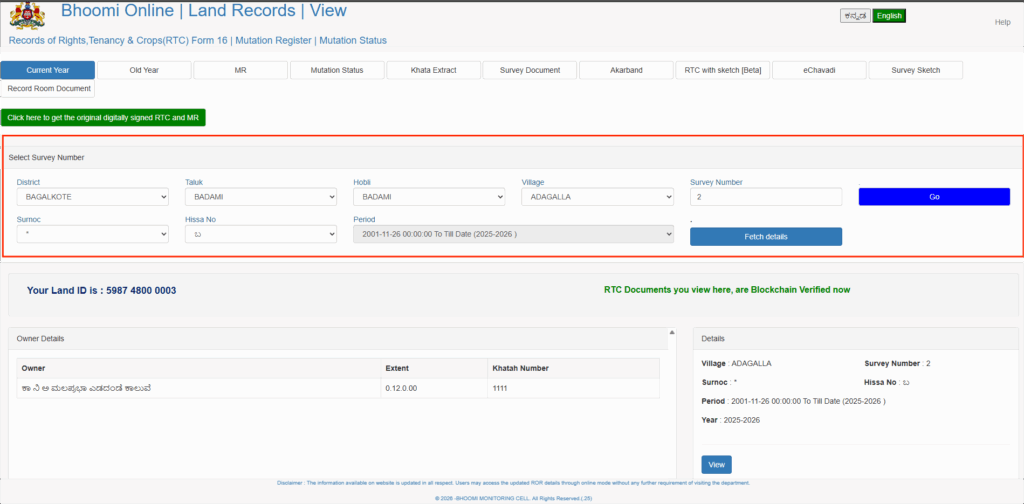
- Fetch Details:
After enter all details, click on “Fetch Details” button to get land records from Bhoomi portal.
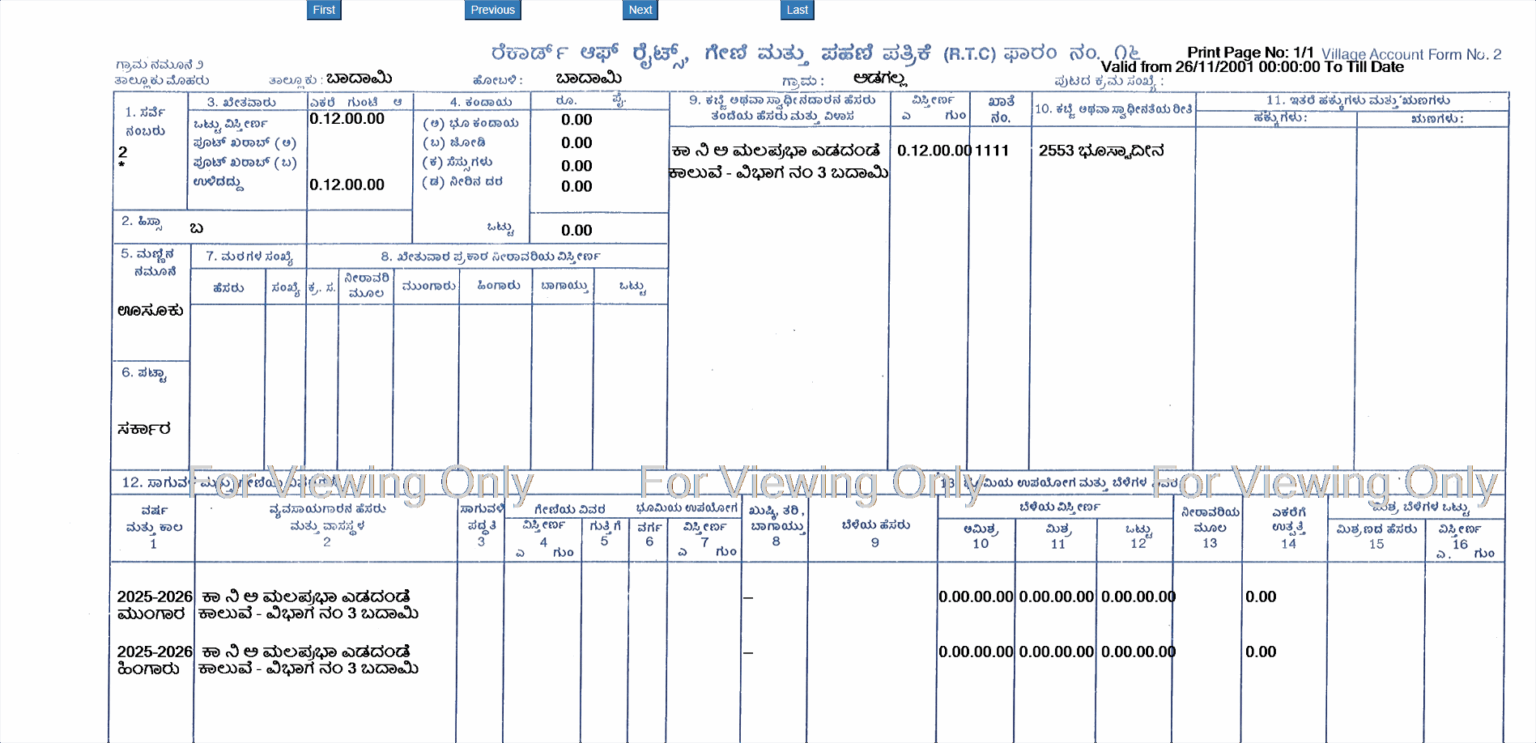
- View or Print RTC:
After the RTC details appear on the screen, you can download and print the original RTC (Pahani) document. A small fee is required to generate the official online copy. Simply follow the on-screen instructions to make the payment and get a printable version of the RTC document.
How to Extract Mutation Report on Bhoomi Online Portal
To access your Mutation Report (MR), which records updates in land ownership caused by sale, inheritance, partition, or property transfer, follow the step-by-step instructions provided on the Bhoomi Online portal below:
- Access the Bhoomi Portal:
- Visit to official Bhoomi website https://landrecords.karnataka.gov.in/.
- Visit to “View RTC and MR” section. These allows you to view both RTC (Pahani) and Mutation Reports.
- Select the Mutation Option:
- Click on Mutation option.
- Fill the required details and property details:
- District
- Taluk
- Hobli
- Village
- Survey Number
- Fetch the Mutation Details:
- Enter all the information, click on “Fetch Details” button.
- You can get Mutation Report for entered survey number.
How to Check Affidavit-Based Land Conversion Status in Karnataka
Follow the steps below to track the status of your affidavit-based land conversion application online:
- Visit to Official Website👉 https://landconversion.karnataka.gov.in/Service74/afdlcreport/
- Select Report Option.
- On the page, you’ll find multiple options for viewing the land conversion status, including:
- Pendency with RD User
- Pendency Report with Request ID
- Pendency with Other Departments
- Pendency of UPOR Report
- Disposed Request
- Enter required details.
- After select a report type, enter your District.
- Click on “Fetch Report” button. View the status.
- After the information is displayed, you can check complete details of your affidavit-based land conversion application, including the current application status, departments handling the request, and any updates or actions taken.
How to Check Survey Number in Karnataka
A Survey Number is a distinct identification number allotted to a particular piece of land. In Karnataka, landowners can easily find their survey number using the Karnataka State Land Information System (KSLIS) or through the Bhoomi Online portal.
Steps to Check Survey Number via KSLIS Portal
- Visit to KSLIS website https://www.karnataka.gov.in/english.
- Click on Citizen Services.
- Choose “Survey Number Search”.
- Enter Land Details
- Select your District and Taluk.
- Enter the Local Identification Number (if known).
- Click on “Search” button.
- Your land details with Survey Number is displayed.
Bhoomi Online Wallet – IRTC (Integrated RTC Wallet)
The Bhoomi Online Wallet, also referred to as the IRTC (Integrated Record of Rights, Tenancy, and Crops) Wallet, is an important feature of the Bhoomi Karnataka portal. It helps users conveniently access land-related services while securely managing and storing digital land records across the state.
Key Features:
- Digital Payments
- The wallet allows users to conveniently pay for various land services directly through the portal.
- Secure Digital Storage
- It securely stores digital copies of all your land records, making them accessible anytime without needing physical documents.
- Quick Access to Land Information
- You can easily:
- View your digital land records
- Verify landowner details
- Check mutation status
- Access RTC and MR records
Access Your IRTC Wallet
To use your wallet:
- Visit to Bhoomi Online Portal.
- Login with your User ID, Password and Captcha.
- You can access your wallet and manage land records.
Bhoomi Online Wallet – IRTC (Integrated RTC Wallet)
The Bhoomi Online Portal provides a wide range of land-related services for the residents of Karnataka. Although most services are available online for easy access, users are required to pay a nominal fee to download official land record documents.
| Document/Service | Fee (INR) |
|---|---|
| Record of Rights, Tenancy, and Crops (RTC) | ₹10 |
| Mutation Status | ₹15 |
| Mutation Extract | ₹15 |
| Tippan | ₹15 |
Contact Details of Karnataka (HelpDesk)
You can get in touch using your mobile number and email ID. If you have any problems or need more details about land records on the Online Karnataka Portal, use the contact information provided below.
| Contact Type | Details |
|---|---|
| Mobile Number | 080-22113255, 8277864065, 8277864067, 8277864068 |
| Email ID | bmchelpdesk.s@gmail.com, bhoomi@karnataka.gov.in |
| Address | SSLR Building, K.R. Circle, Bangalore – 560001 |
Conclusion
RTC Karnataka and Bhoomi RTC Karnataka are important online services that help people easily check land records in a clear and simple way. With the Bhoomi portal, citizens can view land reports, Pahani details, Mojini records, mutation status, and other land information without going to government offices.
These digital services are very helpful for landowners, farmers, and buyers who want to confirm ownership, check changes, and download official documents safely. Overall, the Bhoomi system has made land record access quicker, more transparent, and convenient for people across Karnataka.
FAQ’s
What is Bhoomi?
Bhoomi Portal Karnataka is an online land records system launched by the Government of Karnataka. It allows citizens to check and download important land documents such as RTC (Record of Rights, Tenancy, and Crops), mutation details, and other land-related reports without visiting government offices.
What is Bhoomi RTC?
Bhoomi RTC is an online land record document available through the Bhoomi Portal Karnataka. RTC stands for Record of Rights, Tenancy, and Crops. It is an official document that shows details about a piece of land. Bhoomi RTC usually includes:
- Land owner name
- Survey number and land size
- Type of land (agricultural, residential, etc.)
- Crop details
- Mutation and ownership history
Can I view RTC online without login?
Yes, you can usually view basic RTC details online without logging in through the Bhoomi Portal Karnataka.
How do you get an online RTC extract of Pahani?
You can get an online RTC (Pahani) extract through the Bhoomi Portal Karnataka website by following a few simple steps:
- First, visit the official Bhoomi portal.
- Next, choose the option to view or download RTC information.
- Then, enter details like district, taluk, village, and survey number.
- After submitting the details, you can view the RTC information online. In some cases, you may need to pay a small fee to download the official copy.
Can I view revenue maps online?
Yes, you can view certain revenue maps online in Karnataka through government land record services like the Bhoomi Portal Karnataka and related land mapping services.
What is the difference between RTC and i-RTC?
RTC is the basic land record that shows ownership, crop, and land details. i-RTC is a digitally signed and officially verified version of the RTC.
What is the full form of RTC?
The full form of RTC is Record of Rights, Tenancy, and Crops. It is a land record document that contains details about land ownership, cultivation, and land type.
What services are available on this portal?
The Bhoomi Portal Karnataka offers services like viewing RTC, downloading i-RTC, checking mutation status, viewing land details, and accessing land-related reports online.
Is Bhoomi RTC free?
Viewing basic land details on the Bhoomi Portal Karnataka is usually free. However, you may need to pay a small fee if you want to download the official RTC or i-RTC document.