
Bhoomi RTC – Karnataka Bhoomi Online
Bhoomi is the official digital land records system developed by the Government of Karnataka. It was introduced to convert paper land records into digital form, making them more transparent, secure, and easy for citizens to access.
The most important document available here is the RTC (Record of Rights, Tenancy and Crops), which is locally called Pahani. Whether you are a farmer applying for a loan or a landowner checking property details, the Bhoomi portal removes the need to visit government offices and lets you access land records from home.
Property Calculators & Verification Tools
Land Area Converter
Stamp Duty Calculator
Buyer Document Checklist
0% Completed
Official Rate Reference
| Property Value | Stamp Duty | Reg Fee | Cess | Total |
|---|---|---|---|---|
| Below ₹20 Lakh | 2% | 2% | 0.6% | 4.6% |
| ₹20–45 Lakh | 3% | 2% | 0.6% | 5.6% |
| Above ₹45 Lakh | 5% | 2% | 0.6% | 7.6% |
Bhoomi RTC Services
Bhoomi Portal
Access complete land record details
Mutation Extract
Download mutation record document
View RTC Pahani
View official land RTC details
Mutation Status Check
Check mutation request progress
Khata Extract
Download property ownership extract
Revenue Maps
View official land survey maps
| Portal Name | Bhoomi RTC |
|---|---|
| Launched By | Government of Karnataka |
| Under | Monitoring Cell (BMC) Revenue Department |
| Services Offered | View Bhoomi RTC and MR, Mutation services, Revenue maps, Khata Extract, i-RTC (digital RTC) |
| Primary Goal | To digitize and make land records accessible |
| Beneficiary | All Karnataka Citizens |
| Benefits | Easy access to land records, transparency, reduced land disputes, online applications for services |
| Official Website | Visit |
Bhoomi RTC Online Karnataka
The Bhoomi portal is a digital platform that allows users to check land record details online. It offers information related to land ownership, tenancy status, and crop data in a simple and accessible way. It is a completely online system created to simplify how people check and handle land records in Karnataka. Using this platform, farmers and property owners can easily view and download their land information from anywhere, reducing the need to visit government offices multiple times.
Bhoomi is a digital platform introduced by the Government of Karnataka to make land records easily available online for residents across both urban and rural areas of the state. Through the Bhoomi Online Portal, eligible residents of Karnataka can easily access land records, mutation details, and important Bhulekh information without facing any difficulty.
| Field | Details |
|---|---|
| Portal Name | Bhoomi RTC |
| Launched By | Government of Karnataka |
| Under | Monitoring Cell (BMC), Revenue Department |
| Services Offered | View RTC and MR, Mutation Services, Revenue Maps, Khata Extract, i-RTC (Digital RTC) |
| Primary Goal | To digitize and make land records easily accessible to citizens |
| Beneficiary | All Karnataka Citizens including farmers, landowners, and property buyers |
| Benefits | Easy access to land records, better transparency, reduced land disputes, faster verification, and improved service delivery |
| Official Website | Visit |
| State | Karnataka |
| Department Responsible | Revenue Department, Government of Karnataka |
| Document Type Available | RTC (Record of Rights, Tenancy and Crops), MR (Mutation Register), Land Ownership Records |
| Mode of Access | Online Portal (24/7 Availability) |
| Language Support | Primarily Kannada and English |
| User Type | Farmers, Landowners, Property Buyers, Financial Institutions, Government Authorities |
What You Need to Know Before Buying or Renting
RTC vs. Mutation Register: What’s the Difference?
One of the most common confusions for new property buyers in Karnataka is understanding the difference between an RTC (Pahani) and a Mutation Register (MR) extract. Although both documents are available on the Bhoomi portal, they serve very different legal purposes.
The RTC (Record of Rights, Tenancy, and Crops) shows the current details of a piece of land. It includes the present owner’s name, type of crops grown, total land area, and any active bank loans or liabilities linked to the property.
The Mutation Register Extract, however, is a record of the land’s ownership history. Every time the property is sold, inherited, or divided, a mutation entry is made. The MR extract works as proof of the ownership chain. When buying land, banks and lawyers usually ask for MR extracts from the past 15 to 30 years to confirm that the current owner listed on the RTC obtained the land legally.
Karnataka Land Measurement System
When you check a Bhoomi RTC document, you usually won’t find land measurements in square feet. The Karnataka revenue department mainly uses a traditional unit called “Gunta.” That’s why it’s important to understand how to convert these measurements so you can be sure you are getting the correct land area for your money.
The Baseline: In Karnataka, 1 Gunta is exactly 1,089 square feet. This is the fundamental unit for agricultural land sub-divisions.
- 40 Guntas = 1 Acre (which equals 43,560 square feet).
- 2.47 Acres = 1 Hectare.
How Stamp Duty is Calculated in Karnataka
Property registration in Karnataka includes three main charges: Basic Stamp Duty, Surcharge/Cess, and the Registration Fee. These charges are calculated based on either the actual sale price of the property or the government’s Guidance Value, whichever is higher.
1. Basic Stamp Duty: For properties priced above ₹45 lakhs, the basic stamp duty is usually about 5.6%. For affordable housing properties below ₹45 lakhs, the government sometimes offers lower stamp duty rates such as 2% or 3%. Because these rates can change, it is important to check the latest state budget or official updates before property registration.
2. Surcharges (BMRDA/BBMP/Village): In addition to the basic stamp duty, a surcharge is charged based on the location of the property. This surcharge is usually 10% of the basic stamp duty amount, not the total property value. The collected amount is used for local infrastructure projects such as rural development and city transport.
3. Registration Fee: Lastly, the Sub-Registrar’s office charges a flat 1% of the total property value as an administrative fee. This fee covers updating records on the Kaveri portal and starting the mutation process in the Bhoomi system.
Why is the RTC (Pahani) Document Important?
The RTC includes important information about a particular piece of land:
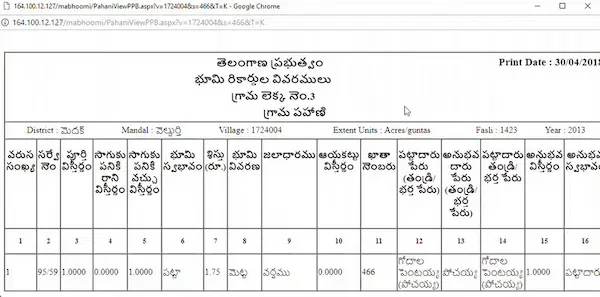
- Owner Details: Who currently owns the land.
- Tenancy: Who is cultivating the land.
- Crops: What crops are grown (essential for crop insurance).
- Land Type: Agricultural, commercial, or non-agricultural.
- Liabilities: Existing bank loans or litigations on the land.
How to Check Bhoomi RTC (Pahani) Online
Follow these steps to check your land records on the Karnataka Bhoomi portal.
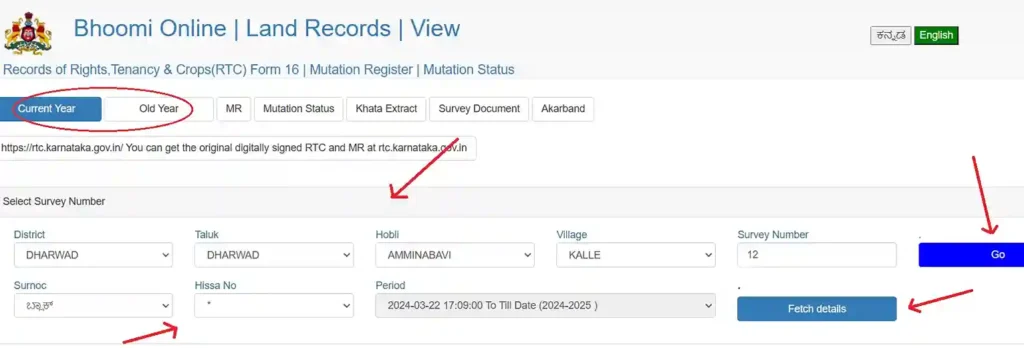
Step 1: Visit the Portal
Open the official Bhoomi Land Record website (landrecords.karnataka.gov.in).
Step 2: Select ‘View RTC and MR’
In homepage, look for the “services” option and click on “View RTC and MR”.
Step 3: Enter Land Details
Add these details where your land is located District, Taluk, Hobli, Village.
Step 4: Survey Number
Add the survey number of your land. The system will ask for the Surnoc and Hissa Number (sub-division number).
Step 5: Fetch Details
Click on “Fetch Details”. The land record (RTC) is on screen. You can check owner names, land extent.
What is a Digitally Signed i-RTC?
A Digitally Signed i-RTC is different from the informational copy because it is an official legal document. It is accepted for court cases, bank loan applications, and property registration. This document includes a unique QR code and a digital signature to confirm that it is genuine and officially verified.
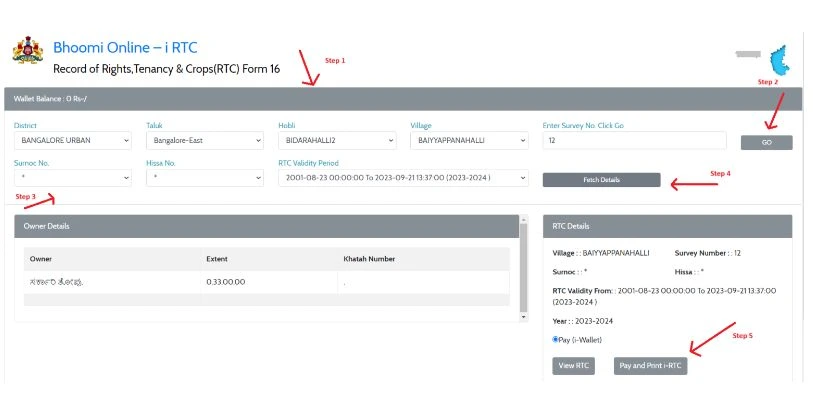
Steps to Download Signed i-RTC:
- Login: Open the Bhoomi Portal and choose “i-RTC Wallet Services”. Login with your User ID.
- Add Money: A signed copy is not free. It costs about ₹15 per copy. First, you have to recharge your wallet using UPI, Net Banking, or Credit Card.
- Search Land: Enter your District, Taluk, Hobli, Village, and Survey Number.
- Pay & Print: Click “Pay and Print.” The PDF will download immediately.
The Bhoomi server is usually under maintenance between 10 PM and 12 AM. If you need to generate an i-RTC (certified copy), it is better to try in the morning when the payment gateway works faster and more smoothly.
How to Check Mutation Status (MR) Online
If you recently bought or sold a piece of land, it is important to verify that the ownership transfer (Mutation) has been properly updated in the official government records.
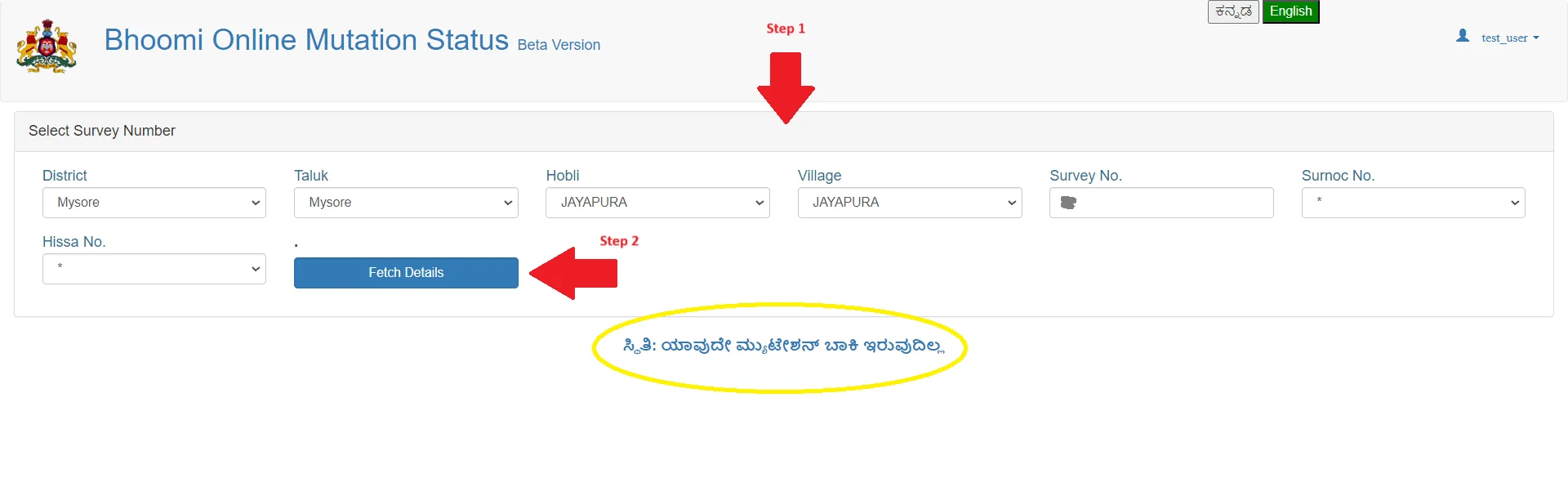
- Open to the “View RTC and MR” section.
- Choose the “Mutation Status” tab.
- Enter the District, Taluk, Hobli, Village, and Survey Number.
- Click “Fetch Details”.
How to View Village Revenue Maps Online?
A Revenue Map displays the geographic boundaries of a village and shows how survey numbers are divided within that area. It helps landowners understand the exact location and shape of their land within the village layout.
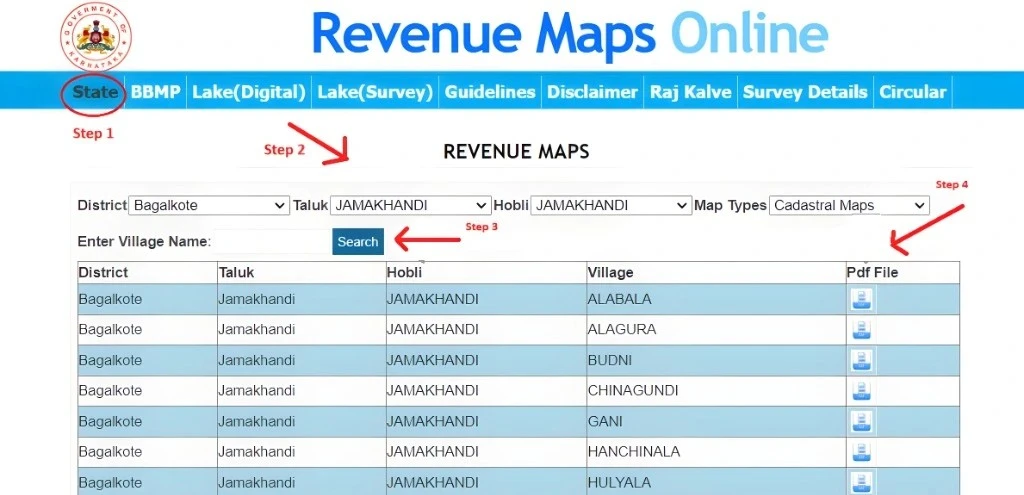
How to Download:
- Open the “Revenue Maps” option on the bhoomi.
- Choose the District, Taluk, and Hobli.
- Select your village from list.
- Click the PDF to download the village map.
What is the Dishaank App?
Developed by the Karnataka Remote Sensing Applications Centre (KSRSAC), the Dishaank app helps users find their land survey number using their current GPS location. This feature is very helpful when buying land, as it allows you to confirm whether the plot actually belongs to the survey number provided by the seller.
How to Use:
- Download Dishaank from Google Play Store.
- Enable GPS/Location services on your phone.
- Go to the land you want to check and open the app.
- The map will show the survey boundaries over your current location, allowing you to see the exact Survey Number and Gomala (government land) information.
How to Verify XML RTC
Why verify? Printed documents may be altered or forged. The “Verify XML” feature checks and confirms that the document you have matches the official data available on the government server. Follow these steps:
- Open the “RTC XML Verification” in portal.
- Add the Reference Number found on your download i-RTC.
- The system will verify whether the document is authentic and then show the official data so you can compare the details.
Bhoomi Service Fees & Charges (2026)
| Service | Document Type | Estimate (₹) |
|---|---|---|
| View RTC | Informational Copy | Free |
| i-RTC | Digitally Signed | ₹15.00 |
| Mutation Status | View Status | Free |
| Mutation Extract | Certified Copy | ₹15.00 |
| Tippan | Survey Sketch | ₹15.00 |
Technical & Access Issues
The portal receives a large number of visitors, so sometimes it may load slowly or show a “Server Not Found” error.
- Browser Compatibility: The website performs best when opened in Google Chrome or Mozilla Firefox. It is recommended not to use older versions of Internet Explorer, as they may cause loading or login issues.
- Clear Cache: If the page is not loading properly or the buttons are not working, clear your browser’s cache and cookies (press Ctrl + Shift + Delete) and then restart the browser.
- Pop-up Blockers: The RTC usually opens in a new window. If nothing happens when you click “View” or “Download,” look for a blocked pop-up icon in your browser’s address bar and choose “Always allow” to enable it.
Payment & Download Issues
| Issue | Solution |
|---|---|
| Money Deducted, No PDF | Visit the “Missed i-RTC” section on the portal. Enter your order number or transaction details to download the document again without making another payment. |
| Payment Status “Pending” | This issue usually gets resolved within 24 hours. Do not make another payment right away. Instead, use the “Check Payment Status” tool on the website to verify your payment. |
| PDF Not Opening | Make sure a PDF reader such as Adobe Acrobat is installed on your device. If the downloaded file shows 0KB, it means the download did not complete properly. In that case, download the file again from the “Missed i-RTC” section. |
How to Login to Bhoomi Online RTC
i-RTC Wallet/(i-Wallet Services) Login
- Go to official Bhoomi website.
- Select ‘i-RTC’ under Services.
- Add your registered login details such as User ID / Login ID, Password, Captcha Code (if required).
- Click on Login button to access your Bhoomi Online account.
- Once you log in successfully, you will be taken to your user dashboard. From there, you can use services such as i-RTC Download, RTC Wallet Services, Land Record Search, and Payment Services (if available).
How To Check Mojini Application Status
If you’re unsure how to check your Mojini application status in Karnataka, you can follow the simple method below to find the required details.
Step 1: Visit Mojini V3 Portal
Go to official Karnataka land survey or land records portal that offers Mojini services. These portal allow users to check application status.
Step 2: Click On Application Status
In homepage click “application status” on the website of Mojini portal.

Step 3: Select “Latest Record/Archived Section”
Next, select one of the two options shown. In this example, we are choosing the most recent record.

Step 4: Search By “Application/Mobile/Survey Number”
You can search through three method Application, Mobile or Survey Number.

Step 5: Fill Detail By (Survey Number)
After selecting your survey number, enter all the required details in the form, such as:
- District
- Taluk
- Hobli
- Village
- Survey Number
- SURNOC
- Hissa No

Step 6: Click the “Get Status” Button
After filling the information. Click on “Get Status” button.

Step 7: Finally, Check Your Mojini Application Status
Once you complete the form with the correct details, the full Mojini application status will appear on your screen.

Bhoomi RTC Login – When Is It Required?
The Bhoomi portal lets users view certain RTC details online without creating an account. However, an RTC login is required to access the following services:
- Downloading Certified RTC Copies (i-RTC)
- Submitting Mutation Requests
- Land Conversion Applications
- Accessing Personalized Services
- Administrative updates
Users who search for RTC Bhoomi login or RTC online login are usually looking to use advanced features or services.
i-RTC Bhoomi & e-Bhoomi RTC Explained
i-RTC Bhoomi is an online facility that issues instant, digitally signed copies of the RTC (Record of Rights, Tenancy, and Crops). These certified documents are commonly required for legal procedures, bank loans, and official land verification.
On the other hand, e-Bhoomi RTC is part of the wider Bhoomi system that offers multiple land-related services. It allows users to view land records, track mutation status, apply for land conversion, and access services related to land disputes, all through a single digital platform.
Land Record Management in Karnataka
While the earlier sections explained how to use the Bhoomi portal—such as viewing and downloading land records—managing land in Karnataka requires more than just knowing how the website works. It is also important to understand how the revenue department and administrative system operate. Although digitization has made land records more accessible, many people still face problems when digital records do not match the actual ground situation. The following guide explains advanced situations, practical troubleshooting methods, and important unofficial procedures of the Revenue Department that can help you protect your land and property effectively.
1. Understanding the Mutation Lifecycle
When you buy land or inherit property, the name change (Mutation) does not happen immediately, even in a digital system. Knowing the officials and approval process behind the “Pending” status can help you take the right steps if there is a delay.
The Journey of a File
After a transaction is registered at the Sub-Registrar’s office through the Kaveri portal, the data is transferred to the Bhoomi system. However, the approval process does not happen immediately, as it must pass through different levels of the Revenue Department for verification and approval.
- The Village Accountant (VA): The first level of review is handled by the Village Accountant (VA), who checks the transaction details against existing land records. If your application status is stuck or showing pending, it is often waiting for the VA’s initial checklist verification and approval.
- The Revenue Inspector (RI): The Revenue Inspector (RI) is the key field officer responsible for visiting the property, verifying possession, and issuing notices to all concerned parties. Strategic Insight: If your application status shows “Pending for RI Inspection” for more than 30 days, it is usually necessary to visit the Nadakacheri office in person and request the inspection to be scheduled.
- The Shirastedar:A supervisory review conducted to confirm that no legal disputes or court stay orders are currently associated with the survey number.
Contact Details of Karnataka (HelpDesk)
You can get in touch using your mobile number and email ID. If you have any problems or need more details about land records on the Online Karnataka Portal, use the contact information provided below.
| Field | Details |
|---|---|
| Address | Monitoring Cell, SSLR Building, K.R. Circle, Bangalore – 560001 |
| Email ID | bhoomi@karnataka.gov.in |
| Helpline Number | 080-22113255 8277864065 8277864067 8277864068 |
Conclusion
RTC Karnataka and Bhoomi RTC Karnataka are important online services that help people easily check land records in a clear and simple way. With the Bhoomi portal, citizens can view land reports, Pahani details, Mojini records, mutation status, and other land information without going to government offices.
These digital services are very helpful for landowners, farmers, and buyers who want to confirm ownership, check changes, and download official documents safely. Overall, the Bhoomi system has made land record access quicker, more transparent, and convenient for people across Karnataka.
FAQ’s
What is Bhoomi?
Bhoomi Portal Karnataka is an online land records system launched by the Government of Karnataka. It allows citizens to check and download important land documents such as RTC (Record of Rights, Tenancy, and Crops), mutation details, and other land-related reports without visiting government offices.
What is Bhoomi RTC?
Bhoomi RTC is an online land record document available through the Bhoomi Portal Karnataka. RTC stands for Record of Rights, Tenancy, and Crops. It is an official document that shows details about a piece of land. Bhoomi RTC usually includes:
- Land owner name
- Survey number and land size
- Type of land (agricultural, residential, etc.)
- Crop details
- Mutation and ownership history
Can I view RTC online without login?
Yes, you can usually view basic RTC details online without logging in through the Bhoomi Portal Karnataka.
How do you get an online RTC extract of Pahani?
You can get an online RTC (Pahani) extract through the Bhoomi Portal Karnataka website by following a few simple steps:
- First, visit the official Bhoomi portal.
- Next, choose the option to view or download RTC information.
- Then, enter details like district, taluk, village, and survey number.
- After submitting the details, you can view the RTC information online. In some cases, you may need to pay a small fee to download the official copy.
Can I view revenue maps online?
Yes, you can view certain revenue maps online in Karnataka through government land record services like the Bhoomi Portal Karnataka and related land mapping services.
What is the difference between RTC and i-RTC?
RTC is the basic land record that shows ownership, crop, and land details. i-RTC is a digitally signed and officially verified version of the RTC.
What is the full form of RTC?
The full form of RTC is Record of Rights, Tenancy, and Crops. It is a land record document that contains details about land ownership, cultivation, and land type.
What services are available on this portal?
The Bhoomi Portal Karnataka offers services like viewing RTC, downloading i-RTC, checking mutation status, viewing land details, and accessing land-related reports online.
Is Bhoomi RTC free?
Viewing basic land details on the Bhoomi Portal Karnataka is usually free. However, you may need to pay a small fee if you want to download the official RTC or i-RTC document.